
First, the following message will come from Deluxe:

In Passare, go to the referenced organization.
Then, go to Settings > Features > Integrations.
Make sure the merchant number in the request matches the one on the integration page.
Click Remove account.
If there are multiple accounts, they may only be closing one account. Be sure to check for any additional closure notifications.
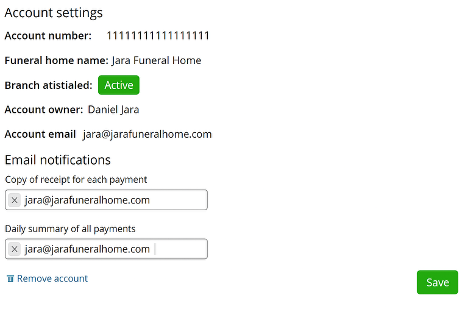
Once the account is removed, use the following template to follow up with the contact in the request, as well as any additional emails on the "Copy of receipt for each payment" and "Daily summary of all payments."
Hello [Contact Name],
We’ve disabled the Deluxe integration on your Passare account at the request of Deluxe. Going forward, you will no longer see the option to swipe or enter card/ACH information for the affected location. The process to log payments will remain very similar, but if you have any questions, don’t hesitate to reach out. I have also attached an article that reviews payments.
If you believe this has been made in error please reach out to Deluxe Merchant Services at: (844) 898-0341 or isvmerchantsupport@first-american.net.