
Skip to:
How it works
Each organization has its own web address (your-organization.cap.passare.com), so you can keep different organizations open in separate browser tabs.
- It's based on your organization's name. Passare builds the subdomain from the organization's nickname, or from its name if there's no nickname.
- It uses only lowercase letters, numbers, and dashes.
- Duplicates get a number. If another organization already has that subdomain, a number is added to the end (for example, -2).
- One login covers every organization. You sign in once for all your organizations. Logging out signs you out of all of them.
- The main address still works. If you go to cap.passare.com while signed out, you'll see the login page. After you log in, Passare takes you to the last organization you used.
Open multiple organizations
Keep your current organization open and work in another at the same time.
Open the organization switcher at the top and find the organization you want.
Click the open in a new tab icon to the right of the organization's name.
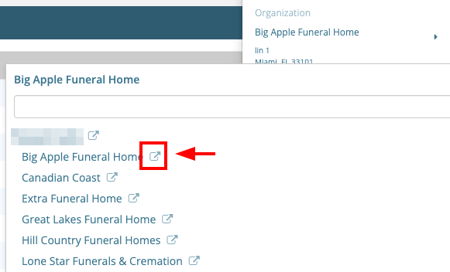
Your current tab stays on its organization, and your "last used" organization doesn't change.
Go straight to any organization you have access to by typing its specific address, or by bookmarking it.
Clicking an organization's name (not the open in new tab icon) in the organization switcher only changes the tab you're in.
- Other tabs stay put. Any other open tabs keep their organization, even after you reload them.
- Your last-used organization updates. This is the organization that opens next time you log in.
- Case links will force a switch. If you open a record from a different organization, like a link to a case, that tab moves to the case's organization.
- Reports follow the tab. A report you start in a tab is created for that tab's organization.
Change your subdomain
You must have a role with the Organization permission checked (under Settings > Organization > Roles) to change the subdomain. Learn more at Manage roles & permissions.
Changing a subdomain breaks bookmarks and links to the old address. Let your staff know before you change it. If you change the subdomain of the organization you're working in, your tab moves to the new address automatically.
Go to Settings > Organization > Organization info.
Under Basic Information, update the Subdomain field.
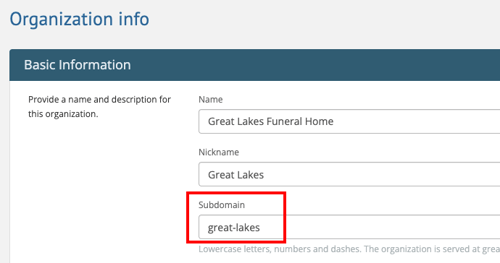
Click Save
Need Help? Email us at support@passare.com or call (800) 692-5111.